msh amatrian..,tp dh lumayan..
karya layout pertama aye..
hehehe..
thx to all my friends!!
*layout dpat diliat disekeliling MP aye..*
Kamis, 18 Desember 2008
Finally My First Layout!!


Pingin Belajar CSS(mw bikin theme ndiri) [Help!]
bwt master CSS bantu ye..
Bru ngerti Colornya aj..
ex: COLOR: #FFFFFF;
n udah tw semua code colornya..
yg mw aye tanya:
1.padding - bottom,up etc.: 10px;
2.border - bottom,up etc.
3.background: transparent;
4.repeat-x fixed #000000;
5.text align
6.font-family: Geneva, Arial, Helvetica, sans-serif; * nyri list font nya dmana??? *
7.text-decoration:none;
8.margin-left,right etc.
9.text-transform: uppercase
10.overflow:visible
artinya apaan tuh??n bs kasi contoh hasil CSS nya g?
n kalo ad link bwt belajar CSS ks tw dunks..
pleasseee help me MASTER CSS!!
Rabu, 17 Desember 2008
nilai raport...oh..nilai raportku..
stress ni,..!!
emang tugas tu biang keoknya kali ye..
1.tugas gambar:tugas1,2,3 blm ngumpul n deadline ud lwat*emang g punya bakat gbr,udh gitu gmbrny aneh2 lg*
2.matematika*sialan tuh guru ngsi tw kalo aye remidi telat bgt,udh pas ngsi tw aye g ad dskul lg,n pas aye samperin,seenaknya dy ngemeng,"waktu nyusul nya udah abis nak..."udah gitu aye dituduh-tuduh g ngumpul tugasnya dy lg..aaarrrgghh!!*
anjrit!!
sialan!!
gile ternyata bukan aye aj yg dgituin yg laen jg,*sepakat bw golok utk gorok tuh guru sialan*
nile raport aye mudah2an g ancur!!
*hope to god*
*nyembah2 deh*
Selasa, 16 Desember 2008
IDM versi berapa????? [Help]!!
IDM merupakan downloader yg paling cepat saat ini.
but,cuman dari beberapa situs aj yg bs menjajikan speed yg gede for example:
1.Mediafire
2.Ziddu(ktnya blm sempet nyoba)
dengan kecepatan rata2 d atas >60kbps.
nah yg mw wa tanyain..
IDM VERSI BERAPA YANG BISA MENSUPPORT MEGAUPLOAD????
yg punya lbih dari 7 source ky gini neh:

pleease~
anyone help!!
berhubung d mediafire cuman ad file2 biasa,n situs yg baek..
tapi kalo megaupload bs donlot*sensor*
Minggu, 12 Oktober 2008
My Yahoo Messenger Account
Anybody have an YM account??
Please add me at:
Ryoo_excalibur@yahoo.com
you can share anything with me..
best regards..
Sabtu, 04 Oktober 2008
KeyHoleTV: Watch Live Japanese TV Online!![recommended]
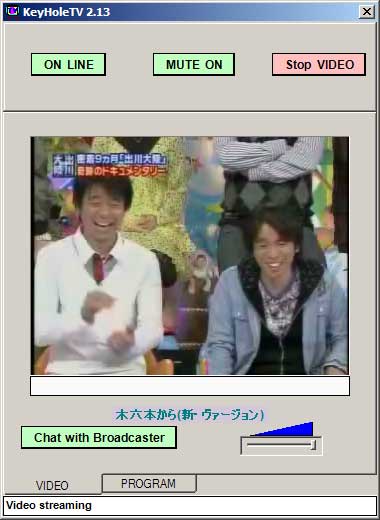 Have you ever wanted to know how to watch real-time, live Japanese TV for free? Maybe you’re trying to learn Japanese, but want to hear real Japanese, and not the type you just hear in Anime. Well there is a free program called KeyHoleTV (キーホールテレビ) that will let you do just that. KeyHoleTV is part of a project by Japan’s Ministry of Internal Affairs testing out P2P (peer to peer) technology. You can also stream your own live video using the same technology with a program called KeyHoleVideo. While the audio and video isn’t the highest quality, it is definitely watchable. KeyholeTV has a decent, but limited selection of channels. The bigger channels are TBS, TV Tokyo, TV Asahi, and Fuji TV. There area also a few smaller channels and user broadcasts that change randomly. If you’re interested in downloading it, here’s a step by step guide.
Side Note: The added a few new features with KeyholeTV version 3.04+. First if you double click the video window, it will open up another window so you can just have the video playing without the rest of the buttons. Also, if you click the button “TOP MOST ON” it will make it so the window stays on top of whatever you are doing!
1. Download KeyHoleTV
Head over to http://www.v2p.jp/video/Viewer/ and download the file labeled “SetupKHTV3.09.exe” or you can just click here: Download KeyHoleTV.
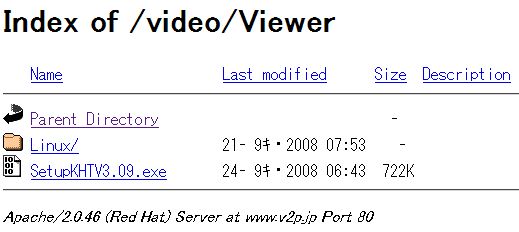
2. Install KeyHoleTV
Select English, or which ever language you are most comfortable reading, and install the program.
3. Run KeyHoleTV
After the install, run the program and then you are going to be presented with the following screen:
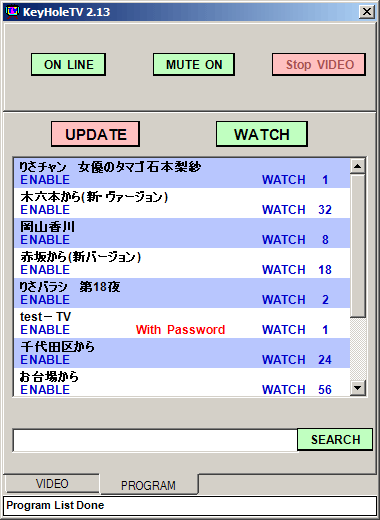
In this screen, you will see various buttons, and the main channel guide. Below I will include a guide to the channels so you know what you’re looking at. A brief explanation of the buttons:
 Logs you on and off of the server. Sometimes you will see errors saying that you are not connected to the server. Just click the button Off, and then back On to log back in.
 Allows you to mute the sound. Trigger On and Off.
 Allows you to stop and start the video.
 The channel listings refreshes every now-and-then. Use this button to manually update the channel listings for KeyHoleTV.
 After you have selected a channel in the channel listings window, click the Watch button to view the channel.
 Right now, you don’t have to worry about this button as there are not many channels available on KeyHoleTV. However in the future, this button is going to be a must have.
 I haven’t seen any broadcasters chatting, but I assume that KeyHoleTV has the option of allowing the viewers to chat with the broadcasters. There is a popular channel that features actress Risa Ishimoto, not sure if you can chat with her or not.
 This tab allows you to view the video window.
 This tabe allows you to view the channel listings.
4. Channel listings
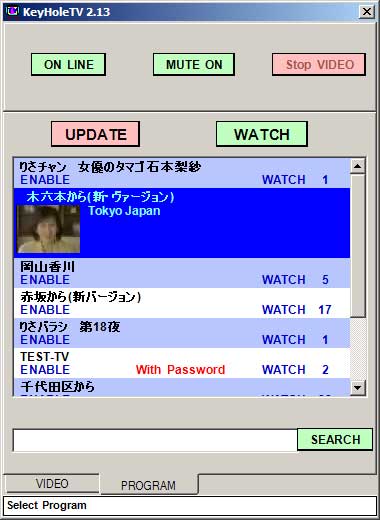 This is the channel listings for KeyHoleTV. On this screen you will see the channel name, a preview picture of whats currently playing, and the amount of viewers watching that specific channel. When you see a high number of people watching, it usually means something good is on. Remember that here in the United States, we are about 14 hours behind JST (Japan Standard Time). So a lot of the popular shows and Anime will come on at odd times for us. Here is a listing of the current channels as of today. The channels are always changing. Match the beginning of the channel name with the English in red:
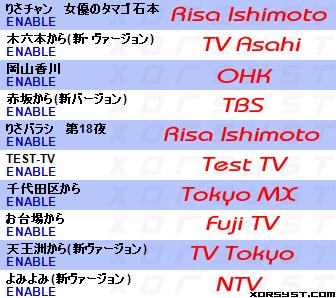
So there you go. If you are using this to help you with learning Japanese, I hope you get a lot out of KeyHoleTV. I will be updating this page when I see new channels, so bookmark the page or subscribe to my RSS Feed so you don’t miss anything. Below are a few TV Guide Japan type websites so if you know Japanese, or can figure out what the kanji means, you can have a better idea of what’s playing.
Minggu, 14 September 2008
Download speed [HELP]
Bru kali Ini Gw maen Internet Kec Donlotnya ampe 60kbps,
BIasanya Cuma 36kbps doank..
Emg Ad prkmbangan ih tp denger2 di Jawa udh Ampe 100kbps lbih untuk donlot..
Yg gw tanyakan:
1.Knp sih Di bali Blom nyampe2 Sih yg kec katanya 1 mbps (speedy)??
2.Ap Hrus ngelapor ke pusat y??
3.Ap gw yg Bego??
Senin, 11 Agustus 2008
How To Remove Or Disable Deepfreeze ??
Gimana Sih Cra Ngilangin Deepfreeze??
Dah Stress berat Nih,..
Pdhal Ud berhasil Di Warnet Org Nge Donlot(hack) Ampe Giga-an Lebih..
Eh...Ujung2nya ketauan Deh...Pnjaga Warnet MAsang Deepfreeze...TIDAAAK!!
Gw Jd G Bsa Nge Donlot(hack) Ampe Puas Lg Deh..
Please Answer My Question..
Sankyu..
Klo bs Step By Step,,
Minggu, 03 Agustus 2008
How to bypass Veoh??
veoh is no longer available in some countries..
This Is How To By Pass Veoh. If Your One Of The Banned Countries. How?
Solution 2:
Step 1.
Find a list of free proxy. You can Google it out. One such list is Here
Now choose an IP address and port from this list. In this tutorial I have chosen IP: 195.175.37.6 and port: 8080. You can choosewhatever you like.

Step 3.
Open Firefox and in the menu choose Tools and then Options.

This will open the Firefox Options window. Click on Advance Options.

Step 4.
Click on Network tab and the click Settings button under Connection.

Step 5.
In Connection Settings window, click Manual proxy configuration. Now enter the IP address in HTTP Proxy and Port address in Port. ( In this example HTTP Proxy address is 195.175.37.6 and Port is 8080).
Also check the box 'Use this proxy server for all protocols'.

Click ok and your IP is set to desired Proxy.
You can use any online service to check your IP. Like http://www.checkmyip.com/ is a site solely dedicated for this purpose. As you can see in the Screenshot below,my local IP is set to 195.175.37.6.
This Solution Works 100% Quick Loading..
I have used This solution...
But,Why It isn't Working??
Tell me The solution..
THX B4..
Selasa, 29 Juli 2008
New Download Music trick In Multiply
Multiply Has Remove "Play This Playlist" Menu from Music Pages..
So we Can't Download It from Winamp Or Downloader..
There Is Another Way to Download Music In Multiply..
1.You Must Have Mozilla Firefox 2.0 Or lower.. Not Working on firefox 3.0
2.Open This Page https://addons.mozilla.org/en-US/firefox/addons/policy/0/2254/17118
3.Accept and install to your firefox..
4.Restart Your firefox
5.Find The music Pages That You Want to Download
6.Click on the fish icon in the corner of mozilla browser..
7.Wait And The Download Button Should be Appear..
If You Have Problem Just Ask Me..
Kamis, 05 Juni 2008
Downtown no Gaki no Tsukai ya Arahende!!
Downtown no Gaki no Tsukai ya Arahende!! (ダウンタウンのガキの使いやあらへんで!! Downtown's "I'm Not An Errand Boy!", alternate translation "Downtown's 'This Is No Job For Kids!!'"?) is a Japanese variety show hosted by the popular Japanese owarai duo, Downtown. This TV program began broadcasting on October 3, 1989, and is a popular comedy show in Japan.
Regular Cast

- Downtown (Hitoshi Matsumoto (松本人志 Matsumoto Hitoshi?) and Masatoshi Hamada (浜田雅功 Hamada Masatoshi?))
- Hōsei Yamasaki (山崎邦正 Yamasaki Hōsei?) - He has been part of the regular cast since 1995.
- Coq au Rico (Naoki Tanaka (田中直樹 Tanaka Naoki?) and Shōzō Endō (遠藤章造 Endō Shōzō?)) - They have been part of the regular cast since 1997.
[edit] Former Regular Cast
- Jimmy Ōnishi (ジミー 大西) - He left the regular cast in 1996 to pursue a painting career. He has subsequently made several appearance in parody instructional videos that are used in the "No-Laughing" batsu games since 2005. In the videos, he either says or does things that are dumb, usually repeatedly, to make the cast laugh. His most famous appearance is in the English Lesson episode of the "No-Laughing High School" game where he pretended to have difficulties with using basic English.
[edit] Semi-regular Cast
- Kenji Suga (菅 賢治 Suga Kenji) - Chief producer. He often appears in fake posters in the batsu games (see below), and cosplaying.
- Toshihide Saitō (斉藤 敏豪 Saitō Toshihide) - Set design, assistant director. Usually referred to by his nickname, Heipō (ヘイポー). Several sketches and games are based on his inability to stomach scary things (however silly they may be) and his perverted nature.
- Hiroshi Fujiwara (藤原 寛 Fujiwara Hiroshi) - Downtown's former manager. He is often seen cosplaying as a female character.
- Ameagari Kesshitai (Hiroyuki Miyasako (宮迫博之 Miyasako Hiroyuki) and Tōru Hotohara(蛍原徹 Hotohara Tōru)) - A comedy duo that has occasionally joined the regular cast.
- License (Kazuhiro Fujiwara (藤原一裕 Fujiwara Kazuhiro) and Takafumi Eimoto (井本貴史 Eimoto Takafumi)) - A comedy duo that works at the show and has occasionally joined the regular cast. Fujiwara is also known as "Vacuum Fujiwara" because of his eating ability, which is used as a running gag in some skits.
- Itsuji Itao (板尾創路 Itao Itsuji) - A member of the comedy duo 130R.
- Shōhei Shōfukutei (笑福亭笑瓶 Shōfukutei Shōhei) - A rakugo artist. He is also known for the ショウヘイヘイ!(Shōhei-Hey!) phrase said in the police batsu game.
[edit] Other Cast
- Hosshan (ほっしゃん。) - Another comedian that makes appearances during the batsu games. His signature trick is sticking things up his nose and coughing it out through his mouth. This gag consistently makes the cast laugh.
- Itao's Wife - She is a foreigner (possibly Indian, as demonstrated in one episode where Itao is married to her in a fake wedding), and not Itsuji Itao's real wife. She makes appearances horribly dancing along to Madonna or other dance songs and has, as one member of the main cast remarked, "a large repertoire".
- Ayako Nishikawa (西川史子 Nishikawa Ayako) A former Miss Japan who later became a physician. She makes a guest appearance as Heipō's "date," as the medical examiner in the police batsu game, and as the morgue attendant in the hospital batsu game. Her roles tend to be sadistic, often used to great humorous effect.
- Obachan Ichigo and Obachan Nigo (おばちゃん一号 and おばちゃん二号, or literally, Old Lady #1 and Old Lady #2) - Two elderly women who often appear in the batsu games, dressed in strange outfits (on one occasion they dressed as t.A.T.u.) or getting the cast into compromising positions. A running gag is that of cast members being forced to French kiss Obachan Ichigo.
- Konya ga Yamada (今夜が山田 - literally "Tonight Is Yamada!"; Real name: David Hossein) - He is the former manager of Thane Camus. He played a role as a ringside doctor in Dynamite Shikoku's wrestling matches (Dynamite being a character played by Endō). During the "No Laughing" batsu games, he says his name over and over in different variations (sometimes singing it) while the cast try to sleep. ("Kon'ya ga yama da" means "Tonight is crucial" in Japanese, but Yamada intentionally mispronounces it.)
- Chiaki (千秋 Chiaki) - Endō's wife, now ex-wife (they divorced in December of 2007). Chiaki usually appears in the No-Laughing batsu games, doing something cute and attempting to make the cast laugh. Since the batsu games frequently have the cast stuck in a waiting room or hotel room between skits, another running gag involves Endō being tricked into opening a desk drawer and finding several pictures of his wife in it. (In the No-Laughing High School batsu game, a recording of Endō shouting "Chiaki! I love you!" was played twice while the cast attempted to sleep, and Endō's PE shirt had "Chiaki LOVE" written in pink letters on a pink tag in lieu of his name.)
- Takahiro Matsumoto (松本隆博 Matsumoto Takahiro) - Hitoshi Matsumoto's older brother. He makes occasional appearances in the batsu games, sometimes singing and playing guitar. Not to be mistaken for guitarist Takahiro Matsumoto of the popular rock band B'z.
- Hanako (山田花子 Yamada Hanako) - A strange (possibly alcoholic, as she is almost always drunk) girl who often tries to talk to the cast (much to their dismay) during the No-Laughing games. She often lures them into mistakenly talking to her (such as calling them to her bathroom in the No-Laughing High School game or making them open a car, only to find her tied up and gagged in the back seat in the No-Laughing Police Station game) and will latch onto some part of their body when the victim tries to leave. Her years as a comedienne are often used as a running gag whenever she encounters Endō, as she has been in the entertainment business for a longer period of time.
[edit] Segments
[edit] Batsu Games
Probably the best known Gaki episodes are those dealing with batsu games, or punishment games, in which one or more of the cast members participate in after losing bets, major games, or physical challenges.
[edit] No Laughing Games
The premise of each "No Laughing"-punishment game is, members of the cast who were not successful in completing a preliminary trial will be subjected to compromising, absurd, generally ridiculous situations for a long period of time (up to 24-hours, thus far) but must refrain from laughing at any of them. Whenever someone does so, and he is caught by A Watcher, the announcer of the game will declare that person as having just become "out" (アウト or a-u-to in Japanese); immediately afterwards, the appropriate number of "hang-men" will come out to mete the rule breaker's punishment. (To date, this has been executed via single strikes on the buttocks {or somewhere in that area} with a weapon — one which does not change mid-game.)
To keep the Gaki no Tsukai Guys on their toes, there have been occasions where other conditions besides laughing had been set that could make them out, if fulfilled; also, the "victors" of the prelim-trial can make appearances during games to wreak further mischief and potentially cause even more discomfort to the losers.
(All of these games get aired on New Year's Eve as specials, spanning an hour or even longer.)
- No-Laughing Hot Spring Inn (2003)
The first batsu game of this type, it served as the punishment for Matsumoto, Yamasaki, Endō, and Tanaka, for losing to Hamada in a 4 vs. 1 bowling match.
Laughing during this game meant having a dart, from a blow-gun, shot into the buttocks.
Given the newness of the concept, this punishment game was carried out in a somewhat "primitive" way: the Watchers were more lenient with enforcing the rule, and the auto sound blared rough over the sound-system that was set up through the facility.
- No Laughing in Yugawara (2004)
The second spa-themed batsu game, filmed at Yugawara, Kanagawa. Yamasaki, Tanaka, and Hamada were the victims. (This batsu game features Endō's luchador character Dynamite Shikoku.)
- No-Laughing High School (2005)

In this game, the entire cast (except Hamada) is sent to 'high school' for one day. The punishment weapon for this game is the shinai.
The English-lesson portion of this batsu game might be the single best-known Gaki no Tsukai segment outside of Japan, to date.[citation needed] For this lesson, the cast is forced to sit in a pre-designated classroom to watch a mock-educational video, where Jimmy Ōnishi is demonstrating what he had learned thus far, via reading aloud an article about Marco Polo, counting from 1 to 100, and attempting to recite the days of the week. He acted utterly bewildered by the tasks before him, feigning a sizable number of ludicrous mistakes throughout.
Amongst the errors Jimmy committed that had gotten the cast cited for laughing were:
-
- repeatedly stumbling on the first three letters of "asked," and also pronouncing those three letters as esk; pronouncing "questions" and "Venice" as lotions and Victor (although it might not sound like it due to the idiosyncrasies of Japanese pronunciation, in conjunction with Jimmy Ōnishi's own thick accent)
-
- counting 20 as "ten-ten", 21 as "ten-ten-one", 22 as "ten-ten-two", thirty as "ten-ten-ten", and so on; and then, while using all fingers of both his hands, counting 100 as "ten-ten-ten-ten-ten-ten-ten-ten...ten.....ten"
-
- having profound difficulties with properly reciting the English days of the week — at one point having to inform his interviewer (who was off-camera) that in his previous lessons he was never taught anything past a certain day (Monday), to the sole amusement of Yamasaki
- No-Laughing Police Station (2006)
This batsu game premiered as a three-hour special. The players were Yamasaki, Hamada, and Endō. The hang-men (some of them who were black) were especially rough when giving discipline to offenders.
- No-Laughing Hospital (2007)
This time around, all five of the Gaki no Tsukai Guys took a part of this punishment game — and they were forced to cross-dress as nurses for this one. Yamasaki, who really had just gotten out of a hospital after being treated for enteritis, was permitted to take some absences during the game. Sonny Chiba was among the famous guests who performed here. (As a side note: it was during this game that the record for most punishment-strikes inflicted was set, with Mr. Matsumoto having received 258 of them.)
[edit] Other Batsu Games
Haunted Hotel After Matsumoto loses a swimming match against the other four cast members, a batsu game is set at a "haunted hotel" or ryokan, where Matsumoto must remain overnight. He endures ghost apparitions, a seemingly empty-samurai suit that comes alive, and random knocks on walls among other things.
"24-Hour Tag"/Onigokko (鬼ごっこ) A batsu game that took place over the period of 24-hours (on 10-17-99) where all, except Matsumoto, were locked in a sports arena, playing "tag" with various Oni (demons) (who, here,—except for two or three instances {that were on film},—were men dressed in full-body black suits) that were "summoned" to attack at random moments, each with a specific type of punishment written on the suit to be inflicted whenever the victims were tagged. This batsu game is the result of Matsumoto winning the race against the 4 others in "Gaki no tsukai - 4 tai 1 100m sou Taiketsu!"
No-Reaction Pie Hell (ノーリアクションパイ地獄) In this game, Matsumoto is punished for losing a bet with Hamada over the 2002 Japan Series. In their bet, Hamada picked the Yomiuri Giants while Matsumoto picked the Seibu Lions; the Giants won the series four games to none. Matsumoto's punishment was having to spend a day at home while Hamada, Endō, Tanaka and Yamasaki threw pies at him and everything he touched (including a television set and a toaster), non-stop. Matsumoto had to ignore all of this while following prompts from a narrator over the sound-system.
Gakitanic (Gaki no tsukai — Hamada L.A. de Okan to TITANIC!!) Hamada loses a golf challenge against the rest of the cast and must go to Los Angeles with Matsumoto's mother to shoot the love scene from Titanic.
Hama-chan France Evian Trip In July 1993, Hamada lost to Matsumoto in a running-high jump competition and has to go to Évian-les-Bains, France with the crew to get Matsumoto a bottle of Evian mineral water straight from the source.
Hama-chan New York City Mechanical Pencil Trip Hamada loses a bet on which team (Red or White) would win the 1994-95 New Year's Singing Competition and has to go to New York City with Suga Kenji to fetch a mechanical pencil that Matsumoto lent to ex-baseball player Ryuichi Sakamoto.
Matsumoto Family Rangers (Gaki no tsukai - Souchou Matsumoto RENJAI SHOW!!) Matsumoto loses to Hamada in a long-jump segment and has to perform with his father, mother, older sister and brother as a Sentai/Power Ranger team.
Yamazaki's Hitori Bocchino piano concert in "Gaki no tsukai - YAMAZAKI Scalega Tiisai saiban" (which aired, in two parts, on 11-21-99 and 11-28-99), Yamazaki is brought into the Gaki no Tsukai court to stand trial for the scaredy-cat disposition he exhibits during events, games, and with co-workers. He was, of course, convicted, and had to endure the appropriate batsu gemu as a consequence; here, Yamasaki was to go to a Ryokan late at night to play a piano concert without being scared by all the traps that were set-up for him.
[edit] Silent Library
In this segment, the cast and a sixth member, usually Heipo, are in a staged library in which one of them has to undergo a punishment upon choosing the card with the skull and crossbones on it (similar to Russian roulette). Although the game requires that they remain silent during the entire segment, the members repeatedly let out bursts of muffled laughter that is loud enough for the occupants of the library to hear. Former K-1 champion Ernesto Hoost once made a special appearance.
[edit] Chinko Machine

In a segment from the episode "Ōgiri Daigassen", the participants must recite a long, tongue twister-like promotion for the show without stopping or stuttering. If a participant fails, they are attacked by the “chinko machine”, literally the “penis machine”, a catapult-like lever that swings up and hits the participant in the groin. This batsu game was featured on the August 1, 2006 Oddball segment of Countdown with Keith Olbermann as "Reason Number 261 (of 527) why Japanese television is better than ours."
[edit] 7 Henge
Shichi-henge (七変化, literally The Seven Apparitions) is a segment of the show where the cast and crew sit at a table while a comedian attempts to make them laugh. For each round that a person laughs, they must put 1,000 yen into a box; the collected money is donated to a charity of the comedian's choice. A variation on this, "Horror Shichi-henge," involved several members of the cast and crew ambushing Heipō with the intent of causing him to lose his composure and thus be forced to surrender money. Bob Sapp once made a special appearance on this segment in which he collected 53,000 yen.
[edit] Absolutely Tasty Series
This is a series of cooking segments in which the comedians prepare foods, either traditional Japanese dishes like taiyaki and chawanmushi or foods like pizza, with unusual ingredients to use as fillings or flavors, which is eaten later and given a score ranging from two "skull marks" to ten stars. Endo is notorious for using Frisk, a brand of very strong breath mint, in his food. Matsumoto usually introduces very unusual ingredients such as a bear's paw for takikomi gohan, tuna's head for pizza, a dried cobra for nabe, and toothpaste for pasta.
[edit] Kiki Series
This is a series of competitions where each member tastes a randomly selected product, mostly food and drink but once cigarettes, from many different brands blindfolded. After the tasting period, they must find the product they tasted. Anyone who selects correctly will receive a prize money, usually 100,000 yen, otherwise they take a variety of punishments, such as being hit in the groin by a Chinko Machine or getting slapped by a foreigner.
[edit] High Tension Series
[edit] Genkai series
[edit] Yamazaki vs. Moriman
This is a series of comedic fighting bouts between Yamasaki and the female comedian Moriman which parody the popularity of mixed martial arts competitions.
[edit] Five Rangers Game
In this challenge, all five cast members enter separate dressing rooms and each randomly dress as one of the five colors of Gorenjai (sentai characters from Downtown's other show, Downtown no Gottsu Ee Kanji), and they attempt to complete all five different colors in 6 hours. The chance that the five cast members choose all different colors is 120/3125 (3.84%). The challenge is based on the main running gag of the Gorenjai sketches: that the team members couldn't decide who wore which colors.
On occasion, two additional comedians join the regular cast in a Seven Rangers Game, featuring two additional colors (black and white) added to the regular Gorenjai color configuration. The other rules are exactly the same as in a Five Rangers Game.
[edit] Cosplay Bus Tour series
The bus series usually includes the main cast plus some of the producers or guests cosplaying or dressing up in drag and playing mini games in a bus going around popular Tokyo locations. When one of the players loses a mini-game, he is dropped off in a public location and forced to walk back to the studio alone and looking quite absurd. Past cosplays include female anime characters, kogals, SM queens, and Pink Lady (famous Japanese idols) costumes.
A memorable moment was during the Anime Bus Tour when Yamasaki (who was dressed as Arale from Dr. Slump) was dropped off and told to buy take-out spaghetti for the whole cast on his way back. He attempted to walk back without buying any, but on his way, he ran into Miyasako of the comedy duo Ameagari Kesshitai who had also been dropped off (dressed as Kekkō Kamen). They bought the spaghetti together. Upon arriving at the studio, Miyasako revealed Yamasaki tried to return without buying the food. Appalled and outraged, as punishment, Matsumoto ordered him to go buy spaghetti in Italy -- specifically, to the "very tip of its heel," referring to the country's distinct boot shape. A few weeks later, Yamasaki was forced to fly to Lecce, Italy to buy a plate of spaghetti from a restaurant, all while still dressed as Arale.
[edit] Broadcasting TV stations
- Nippon TV, Sapporo TV, Aomori Broadcasting Corp., Miyagi TV, Yamagata Broadcasting Co., Fukushima Central TV, Yamanashi Broadcasting System, TV Niigata, Kitanihon Broadcasting Co., TV Kanazawa, TV Shinshu, Shizuoka Daiichi TV, Nihonkai TV, Yamaguchi Broadcasting Co., Nishinippon Broadcasting Co., Nankai Broadcasting Co., Kochi Broadcasting Co., Nagasaki International TV, Kumamoto Kemmin TV, Kagoshima Yomiuri TV - from 10:56 p.m. until 11:26 p.m. every Sunday (JST)
- Fukuoka Broadcasting Corp. - from 12:50 a.m. until 1:20 a.m. every Saturday (JST)
- Yomiuri TV (Kansai), TV Iwate, Hiroshima TV - from 012:26 a.m. until 12:56 a.m. every Wednesday (JST)
- Akita Broadcasting System, Inc. - from 12:31 a.m. until 1:01 a.m. every Thursday (JST)
- Chukyo TV - from 1:20 a.m. until 1:50 a.m. every Friday (JST)
- Ryukyu Broadcasting Corp. (affiliated with JNN and TBS Network) - from 1:25 a.m. until 1:55 a.m. every Tuesday (JST)
Selasa, 06 Mei 2008
Disable and Bypass MegaUpload Country Download Slots Limit
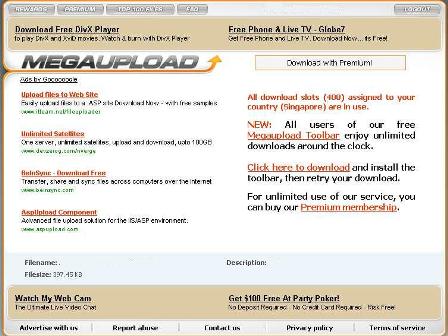
When the limit is hit, the message such as “All slots assigned to your country are in use, try again later” will appear. To hack the MegaUpload download slots limit by country so that you can bypass the download slots limit, anonymous surfing or referrer blocker service can help:
If MegaUpload download link is http://www.megaupload.com/?XXXXXXX
Then replace the URL to the following format:
http://anonym.to/?http://www.megaupload.com/?XXXXXXX
Alternatively, use any anonymous surfing service such as Anonymouse or Guardster free web proxy to bypass the MegaUpload download limit. Steps to use Guardster to bypass MegaUpload Country limit are:
- Go to the following site: http://www.guardster.com/subscription/proxy_free.php
- Input the MegaUpload download link in the Address text box. (where you will see http:// in the box)
- Uncheck (Unselect) all the options, like No Cookies, No Scripts, No Images, Hide Referrer, Hide User Agent, Hide Title, Hide Header.
- Click on the button “I agree an wish to surf anonymously”.
Another workaround for MegaUpload slots limit is by using Google Language Tool translation capability.
- Go to Google Language Tool, and scroll to Translate section. Or you can go direct to Google Translate.
- Input MegaUpload download link into the tex box (where you can see http://) below the “Translate a web page:”.
- For “from” option, the default (depending on your Google interface) English to German will do the trick, although other options will likely to allow the hack too.
- Click on the “Translate” after the language option, and wait for the MegaUpload download page to load, which allows you to start download immediately without the limitation by download limit per country.
99 Ways to Improve Your Blog
This post will hopefully give you plenty of ideas for making some improvements to your blog. We all have room for improvement but sometimes it’s just a matter of knowing different ways of doing things. This is a rather extensive list, but I’m sure there are items that have been missed, so please leave your feedback.
Content
1. Write Better Content
Quality of content is the most important criteria for blogging success. Great content makes marketing your blog easier, and you’ll be abel to improve the community around your blog as others recognize the value of the information that you provide. Writing better content is not always easy, but we can all place more importance and dedicate more time to content development.
2. Set Aside Time for Brainstorming
Writing skills aren’t the only requirement for creating great content. First you have to have original and interesting ideas. Without good ideas for posts your quality of content will suffer, even with the best of writing skills. Set aside time each week or month to brainstorm and come up with as many post ideas as possible. Several months ago I wrote a guide on brainstorming techniques for bloggers.
3. Hire Other Writers
If you’re unable to produce enough quality content for your blog, paying others to do it for you is always an option. There are plenty of bloggers who are willing to write for pay. If your blog can produce more money than you spend it may be a situation to consider.
4. Publish Guest Posts
Many bloggers that want more comment but can’t afford to pay writers will publish guest posts from other bloggers. Guest posting is great for everyone as it gives the blog owner some free content, gives the writer some exposure and a link, and it gives readers more content and a different perspective.
5. Publish More Frequently
Would your blog benefit if you were to publish more posts? Not every blogger needs to post more frequently, but some could definitely benefit from it. More posts means more content for readers, more pages for search engines, and hopefully more traffic for you.
6. Publish Less Frequently
On the other hand, do you publish too frequently? Some bloggers could benefit by reducing quantity and increasing quality. There are plenty of authority bloggers that choose to post less frequently and always provide top-notch content. Maki of Dosh Dosh is probably the best example.
7. Start a Weekly Series
You may be able to improve reader anticipation by posting on a particular topic on the same day every week. This can help to create more interest in your upcoming posts, plus it can effectively brand your blog.
8. Link Out More Often
Do you make an effort to link out to other blogs in your posts? Try to find opportunities to link to valuable and relevant resources whenever possible. Others will notice and appreciate it, and many are likely to return the favor. Plus you will be helping readers by putting more information at their disposal.
9. Use More Internal Links in Your Posts
External links aren’t the only links that are important in your posts. Always take a moment before publishing a post to look for opportunities to link to old posts. Internal links can help with search engine rankings, they can drive click-through traffic, and they can also help if scrapers are stealing your feed.
10. Get Rid of Some of Your Other Projects and Focus
Are you trying to do too much at once? Many bloggers are running multiple blogs simultaneously, and too often the result is that all of the blogs suffer from neglect. If you are stretched too thin, give up some of your projects that aren’t as important to you.
11. Include a Podcast
Offering a podcast is one way to add some diversity to your blog and to attract a new audience. Podcasting is not difficult with modern blogging platforms and FeedBurner. For more information, read How to Create Your Own Podcast .
12. Publish Video Posts
Many bloggers have discovered the impact of video blogging. Darren Rowse of ProBlogger regularly publishes video posts, and they seem to always draw a good amount of attention. With the easily-accessible technology that is available, video blogging is an option for just about anyone.
13. Run a Poll or Survey
Polls and surveys can be a fun way to improve interaction from readers, and you can even learn a lot about your readers during the process. WordPress users can easily add a poll to their blog with the WP-Polls plugin. PollDaddy is another free, popular option.
14. Listen to Suggestions from Readers on Content
If you want to provide readers with content that they will appreciate, listen to their suggestions and feedback to see what types of content they like, and what they don’t like. Polls and surveys can be useful for this purpose as well.
15. Update Posts that are Out of Date
It is almost unavoidable that some of your posts will eventually become out of date. This is an understandable part of blogging, but what you should avoid is the confusion and misrepresentation that sometimes comes with these situations. Imagine someone does a Google search for a particular topic and they arrive at one of your old blog posts. To them this is new information and they may assume that it is your current information, not realizing that it is out of date. It can be helpful to include a brief statement at the beginning or end of the post that the situation has changed and the content may not be current anymore.
16. Link to Related Posts
Your readers who are interested in a particular post may also want to read your other posts that are related to the topic. WordPress users have several different plugins to choose from, including the popular Related Entries.
17. Move AdSense Out of the Way
Nothing is more annoying and distracting to readers than advertisements right in the body of the content. If you are going to use AdSense to monetize your blog, at least put it in a location that won’t distract readers (assuming you care about the readers’ experience on your blog and not just the AdSense income).
18. Publish Interviews with Top Bloggers in Your Niche
Interviews can be a great source of information for readers and they can also give you some valuable networking opportunities. Most bloggers are open to interviews, they just aren’t asked very often.
19. Answer Reader Questions in Posts
Some bloggers are very effective at helping their readers by dedicating posts to answering questions from readers. This can help you to come up with content ideas, improve your blog’s value to readers, and get readers actively participating.
20. Proofread Your Posts
We all make mistakes, but by proofreading your posts you can help to present a professional image to your readers. Be sure to spell check your posts before publishing and try to find and fix any grammatical errors.
21. Use the Timestamp Feature When You Will Be Away
Publishing content while you are on vacation or away from the computer doesn’t need to be difficult. Most of the leading blogging platforms offer the option to timestamp the post for a future date and time. When that time comes the post will be published just as if you had done so manually.
22. Use a Blog Editor
Many bloggers use word processors to write their posts because sometimes the standard system from a blogging platform isn’t ideal. However, word processors can cause problems because they insert a lot of unnecessary code that will hurt the performance of your blog. Blog Editors offer the best of both worlds. My editor of choice is Blog Desk .
Functionality
23. Install the Top Commentators Plugin
One way to reward readers that participate and encourage others to get involved is to install the Top Commentators Plugin (for WP). This will put a list in your sidebar with the names and links to those who have participated the most.
24. Change Up Your Sidebar
When was the last time you made some modifications to your sidebar? Chances are your regular readers have kind of gotten used to what’s there and they probably tune it out. From time-to-time it can be beneficial to change things up a bit and add some new features or content to the sidebar.
25. Separate Trackbacks from Comments
Most blogs display trackbacks and pingbacks along with comments from readers. This can help to show that others find your content valuable, and a lot of trackbacks and pingbacks can be impressive to readers. On the other hand, they can also get in the way and interfere with conversations throughout the comments. With WordPress there is a relatively simple way to separate them. Michael from Pro Blog Design has a nice tutorial for doing this.
26. Improve Your About Page
Some of your readers will go to your About page to find out more about you. When was the last time you updated your About page? Take a look at it and see how effectively it is communicating to readers.
27. Add a Sitemap
Users can benefit from having a sitemap available, but often XML sitemaps are the only ones that are considered by bloggers. WordPress users can use the Sitemap Generator Plugin from Dagon Design to create a page that links to all other blog posts and pages.
28. Get Rid of Unproductive Widgets
How many widgets and buttons do you have on your blog? How many of them actually produce any type of results, and how many of them are ignored by readers? If you have unnecessary widgets that aren’t doing any good, get rid of them and free up some space while you improve your page load speed.
29. Add a Forum
Some blogs have added to the community aspect of the blog by adding forums. If you have a tightly-focused community that will be interested in communicating with other readers, consider adding a forum. vBulletin is one of the most popular ways to quickly put a forum on your site.
30. Get a Domain Name
If your blog is hosted on Blogspot or anywhere other than a domain that you own, purchase one today. Having your own domain is essential for building and branding a successful blog. I purchase domain names at GoDaddy.com .
31. Get Better Hosting
How does your hosting plan stack up? Many blogs could benefit from a better hosting company. When your blog goes down you’ll realize that paying a little bit more for quality hosting is a good decision. This is especially important if you plan to market your blog with social media.
32. Install Threaded Comments Plugin
One of the best ways to improve the level of communication with readers is to install a threaded comments plugin. WordPress users have a few options, including the most popular, Brian’s Threaded Comments. If you are not familiar with threaded comments, they allow you (and other readers for that matter) to reply directly to a specific comment. Your reply will then be displayed right below the original comment instead of all the way down at the end of the comments. It makes it easier and more effective for you to answer questions and respond to comments. You can see it in action here at PureBlogging.
33. Add Subscribe to Comments Option
In my opinion there is no reason not to allow readers the option of subscribing to comments. Once they leave a response to one of your posts that should have the ability to get any additional comments emailed to them. This is another way to boost the effectiveness of your communication with readers. WordPress users can install the Subscribe to Comments Plugin .
34. Backup Regularly
If blog security isn’t a priority for you, it will quickly become one when you have a problem. There are a number of different ways to backup a blog. My personal choice is to use WordPress’s export feature which creates an XML file that you can save. Then if you ever need it, all you have to do is import it into WordPress and the problem is solved.
35. Delete Spam Comments
Spam comments can be distracting to readers that are really trying to get involved in the conversation, and they can give your blog a negative image. You can either choose to moderate comments before they appear or just go back and delete spam comments as they come in. Of course, plugins like Akismet make this much more manageable.
36. Have a Comment Policy
If comment spam is a problem on your blog, you may want to post an official comment policy that clearly states what is encouraged, what is permitted, and what will not be tolerated. Most likely this statement won’t completely stop spam, but it can help those that aren’t sure what is appropriate and what is not.
37. Give a Disclosure if You Do Paid Reviews
Many blogs write paid reviews as a way to generate some income. This is fine with most readers, but it is helpful for them to know where you stand on paid reviews. Some bloggers effectively use a disclosure to let readers know that they do publish paid reviews, but they can assure readers that there opinions will not be biased because someone is paying them.
38. Remove NoFollow Tags on Comment Links
One way that you can reward those who comment on your blog is by removing the nofollow tags from links in the comments. By doing this you can give your commentors a real, legitimate link in exchange for their participation.
39. Use NoFollow Tags on Comment Links
On the other hand, removing nofollow tags isn’t a good move for everyone. A number of bloggers, including myself on my primary blog, have gone back to nofollow tags. If you are getting a lot of useless comments that seem to be submitted only for a link, you may want to consider going back to nofollow.
40. Delete Unused Plugins
Many bloggers keep a ton of plugins in their folder even though many of them are not being used. Plugins can sometimes cause problems with your blog, so it is best to get rid of any that you are not using.
41. Stay Up to Date with New Versions of Your Blogging Platform
Most blogging platforms, like WordPress, will release new and updated versions. For security and functionality purposes it is good to stay current. Many of the releases of WordPress address security issues from older versions, so if you are not upgrading you could be facing increased risk.
42. Restrict Access by IP Address
You can thwart would-be hackers by only allowing access to your admin folder for specific IP addresses. If you are the only blogger and you always use the same computer this can be pretty easy. Otherwise, you simply need to include the IP address of any user and any computer that needs access. Daniel wrote a nice post at Daily Blog Tips that gives instructions .
43. Reduce Database Calls
Page load speed can be a major issue for some blogs. Have you ever looked through the code of your blog to see how many times it is accessing your database? In most cases there are some simple changes that you can make to reduce unnecessary calls to the database. For example, your blog may display the title of the blog in the header. This is probably checking your database to see what the title is. You can get rid of this by removing that code and replacing it with the actual title of your blog. The same thing is true with a lot of footer links. Whenever you can get the same result without accessing the database you will be speeding up your pages.
44. Add a Contact Form
Some of your visitors will want to get in touch with you, and it may not be appropriate for them to leave a comment that is publicly visible. Give them an easy way to reach you by having a page specifically for this purpose.
45. Create a Custom 404 Error Page
When a visitor reaches a dead link on your blog or mistypes a URL what do they find? Hopefully an error page that actually gives them some information and helps them to find what they may be looking for. Most WordPress themes already have a generic 404 file, all you have to do is add some personalized content and links to help visitors find the pages that they are most likely to be looking for.
46. Fight Scrapers with a Footer Link
Fighting scrapers can turn into a part-time job. One of the best ways to ease the pain is to include a link back to your blog at the footer of your feed. This way you may be notified with a pingback, plus you will be showing readers that the content belongs to you. WordPress users can install the RSS Footer Plugin .
47. Delete Unused Themes
Much like plugins, most bloggers have several unused themes sitting in their content folder. If you are not using a theme and you have no plans to do so, why not delete it?
48. Reduce the Number of Plugins that You Use
I know I have repeatedly recommended plugins for different purposes, but the truth of the matter is that not all of these plugins are right for everyone, and no blogger should be using every plugin that has some sort of beneficial purpose. Excessive use of plugins can slow down your pages and make your blog more vulnerable. Plus, each time you upgrade to a new version you will have the chore of de-activating and re-activating all of the plugins. Only use plugins that provide something that really helps your blog and try to keep that number as small as possible.
49. Clean Up Your CSS File
Over time a CSS file can easily become a mess. Most likely there is a good bit of code in the file that isn’t even being used if you have made some customizations or changes to the site. I wrote a post 23 Resources for Clean and Compressed CSS that should help you with the process.
50. Fix Broken Links
Dead links can be a real frustration for visitors and they can prevent your content from being seen. Broken links are sometimes unavoidable, but you can always fix them and solve the problem. Dead-Links.com is a great free tool that will crawl through your pages and look for dead links.
51. Use a Google Custom Search Instead of the Default Blog Search
Most blogs have a search function, and that is certainly helpful for readers. However, the default searches from blogging platforms are not the best. Some bloggers use a Google Custom Search to more effectively address the issue.
Design and Appearance
52. Change Themes
When was the last time you changed your blog theme? If you use WordPress there are thousands of free themes that are available to use. Give your blog a fresh new look by finding a new and improved theme.
53. Buy a Premium Theme
If you are interested in upgrading your theme and you’re willing to spend $50 - $100 to do so, a premium theme may be a good choice. With premium themes you get a well-designed and highly functional theme, plus the support of the designer.
54. Pay for a Custom Design
Stepping up a notch from a premium theme, you could pay a designer to develop a customized theme just for your blog (or you could design one yourself). If you are serious about making money from your blog, this may be your best move.
55. Get a Logo Designed
Another way to enhance the look of your blog without going through a re-design or buying a new theme is to simply add or improve the logo. You can run a competition at a forum to have designers compete for your money, or if you are willing to pay more for a better product you could hire a professional logo designer.
56. Use Images in Posts
One easy way to improve the visual impact of your posts is to include images. You can use the advanced search at Flickr to find photos under the creative commons license, or you can pay a few dollars for an image at places like iStock Photo and Stock Xpert .
57. Change Your Color Scheme
Another way to give your blog a fresh look is to change up the color scheme. This can be a pretty simple process that only involves some changes to your CSS file. If you need some help finding the right color scheme, visit COLOURlovers or Color Schemer .
Marketing
58. Integrate Tools/Widgets for Social Media
Social Media Marketing is one of the best ways to get free exposure for your blog. You can encourage readers to vote for you and make it easy for them by adding some elements to your posts, such as buttons or widgets for specific social media sites.
59. Use Niche Social Media Sites
Most bloggers that attempt to gain traffic from social media focus on the major sites. like Digg. Getting to the front page of Digg is no easy task, and it really won’t produce traffic that is very targeted. Niche social media sites will send lower volumes of traffic, but popularity will be more attainable and the quality of traffic will be better. You can find social media sites in your niche at this categorized list of sites .
60. Build Profiles on Major Social Media Sites
For targeting the major social media sites, building a strong profile is one of the best ways to improve your results. To build a profile you should be actively using the site on a daily basis and always keep your eyes open for great content that you can submit.
61. Give Something Back to Your Readers
All blogs provide readers with content. What else can your do for them? By giving something back to your readers you can do a better job of building the community around your blog and developing a relationship and trust with your readers. There are a number of possibilities for giving back to your readers, and some that are mentioned at other places in this post. You could run a contest, give away some free advertising, give away an e-book, basically anything that will add value to your readers above and beyond the blog posts.
62. Feature Your Best Content Somewhere on the Blog
Some of your visitors will not be familiar with your blog and they may not have seen your best work. Somewhere on the blog you should have a list of links to your best or most popular posts. New visitors will hopefully take a look and see the quality.
63. Write for Other Blogs
One of the best ways to gain exposure and to build some name recognition is to write for other blogs. You can either do so as a guest blogger or as a paid writer. Usually if you are providing a free guest post you will get a brief bio statement and a link back to your blog. When you are doing paid writing you typically won’t get the bio or the link, but the exposure will still help.
64. Run a Contest
You can create some excitement from subscribers and generate some buzz by running a contest. Of course, people like to win things, so contests are a fun way to satisfy your readers. You can either put up some of your own money for prizes, or you can get others to sponsor the contest, which has been done very effectively be a number of bloggers.
65. Participate in Group Writing Projects
Group writing projects are a good way to get involved with other bloggers, get a link to your blog, and get exposure to a new audience. Check out Group Writing Projects to find some new opportunities.
66. Do Some Statistical Analysis
Do you know what types of posts draw the most traffic and the best response from your readers? Do you know where your traffic is coming from and what terms people are using to find you in the search engines? Use a tool like Google Analytics to do some basic stat checking on your blog and implement what you learn.
67. Submit Your Blog to Directories
Directories can be helpful for allowing new readers to find your blog, and they can also be good for search engine rankings. There are literally thousands of directories, blog directories, and RSS directories that you could submit to. Unfortunately, you’d have to spend days of your valuable time to get it done. You can submit it yourself to the top directories, or pay someone else to do it for you.
68. Set Up FeedBurner’s FeedFlare
I’m going to assume that you are already using FeedBurner since it is basically a necessity. FeedFlare is a simple way to add some nice elements to your feed that will allow subscribers to interact and share your content. There are a number of options to choose from, including links that will submit and vote for your posts at all the popular social media sites. To set up your FeedFlare, login and click on “Optimize” and then “FeedFlare.”
69. Release Your Own Blog Theme
Do you have an attractive blog theme that people really like? Have you considered releasing it for others to use freely? This has been done by a number of blogs, and sometimes it is done right after upgrading to a new theme. That way you can give something away without allowing everyone else to look just like you.
70. Use Entrecard
Entrecard is a unique way to make your sidebar more productive. With Entrecard you can network with other bloggers and with your readers, and drive traffic to your blog.
71. Submit Your Posts to Blog Carnivals
One of the easiest ways to start building links to your blog is by using blog carnivals. You can submit one of your posts to a carnival on a specific topic and if the host decides to include your post you will get a backlink. There are carnivals on just about every topic you can think of.
72. Host a Blog Carnival
Another method for driving traffic to your blog is to host a blog carnival. In this situation other bloggers will be submitting their posts to your carnival, and sometimes those who are included will also promote the carnival once it is published. If you’re looking for an easy way to get some other bloggers to visit your blog, consider hosting a carnival.
73. Submit Your Blog to Web Design and CSS Galleries
If your blog features a unique and attractive design (not a free theme), consider submitting it to web design and CSS galleries. There are more galleries than you can keep track (there’s a good list at Virtual Hosting). These galleries can give you a great deal of exposure and send some traffic and links your way.
74. Encourage Bookmarks
Bookmarks are a great way to increase your repeat traffic. If someone has bookmarked one of your posts they obviously have some intention of coming back to it later. Make it easy for your readers to bookmark by using the del.icio.us tagometer badge or something similar.
SEO
75. Give the Blog an SEO Check-Up
Most bloggers initially set up there blog to be search engine-friendly, however, over a period of time your blog may develop the need for an SEO checkup to keep the blog optimized. There are a number of free tools that can help you to check the SEO health of your blog. For a list of some of the best tools, see Giving Your Blog an SEO Check-Up .
76. Improve the Structure of the Blog for SEO Purposes
Blogs can be very search engine-friendly, or they can be SEO nightmares. What have you done to prevent duplicate content, to create optimized page titles, to use better URLs, etc? By improving the structure of your blog you may be able to drastically increase your search engine traffic. WordPress users see WordPress SEO from Joost de Valk.
77. Use Custom URL Structure
Some blogs create URLs that are no help for search engines. WordPress users have the option to set up custom URLs that will be more search engine-friendly rather than using the number of the post.
78. Use Custom Slugs
WordPress users also have the option within each post to create a custom slug. How often do you use this feature? Try keeping your URLs shorter and full of keywords with this simple feature.
79. Give Each Post a Meta Description
The meta description may not have a big influence on search engine rankings, but it can significantly influence the click-through rate to your pages from the SERPs. The meta description is shown by most search engines to tell searchers what your page is about. Use the description to draw attention and increase the chances of a click.
80. Use Robots.txt to Block Duplicate Content
One of the most effective ways to control and prevent duplicate content is by using the robots.txt file. With robots.txt you can instruct search engines to ignore certain pages and types of pages (for example your archive or category pages) which means your posts are less likely to suffer from the penalties of duplicate content. WordPress users should see the article on Shoemoney about robots.txt .
81. Submit a Google Sitemap
The easiest way to get you pages indexed in Google is to submit an XML sitemap that lists all of your pages and posts. The Google Sitemaps Generator for WordPress is a great tool.
82. Don’t Add Posts to Multiple Categories
An easy way to prevent duplicate content is to limit your posts to one category. By adding it in multiple categories you will be adding it to more archive pages, which increases the chances of a duplicate content penalty.
Networking
83. Build a Network with Other Bloggers
Other than creating great content, networking is the best thing you can do with your time. Every successful blogger has a strong network of other bloggers. Everything is easier when you have a good network and you’ll make a lot of friends along the way.
84. Thanks Others for Links
When other bloggers link to you, take a moment to leave a comment and thank them for the link. They’ll appreciate the fact that you stopped by and they’ll be more likely to link to you again in the future. Everyone likes to be thanked.
85. Comment on Other Blogs
One of the basics of blog networking is commenting on other blogs in your niche. It’s a great way to start getting to know some other bloggers, plus you can help others, demonstrate your knowledge, and drive some traffic to your blog. Try to make some time each day for commenting.
86. Join Groups at MyBlogLog, BUMPzee, and Blog Catalog
Blog community sites are a great place to start networking. You can join groups and communities and get to know some other users.
Making Money
87. Find More Relevant Advertisers
Advertisements will be more effective for the blogger, the readers, and the advertisers if they are highly relevant to the content of the blog. Don’t just throw any advertisement on your blog. Make sure it is useful to readers and the ads will actually be helpful instead of annoying.
88. Use Affiliate Marketing for Appropriate Products
When monetizing your blog, don’t forget affiliate programs. By marketing products and services that are targeted to your audience you can make a nice amount of money. Plus, affiliate programs can help to fill voids when you haven’t sold all of your direct ad spots.
89. Provide an Advertising Page with Details
If you are selling advertising space, set up a page dedicated to providing information and details to potential advertisers. This will hopefully help to generate interest and it will also reduce the amount of questions you get. Don’t forget to let people know why they should advertise on your blog instead of the millions of other blogs out there.
90. Offer Premium Content
Some bloggers make money by selling access to premium content. That premium content could be articles, online tools, a member’s only forum, premium blog themes, etc. To make money this way you have to be able to offer something that others will be willing to pay for.
91. Use an Ad Management System
You can save yourself some time and increase your productivity with an ad server like OpenX or the OIO Publisher plugin for WordPress. These resources will make life easier for you and for your advertisers.
Subscribers:
92. Add an Email Subscription Option
If you are not offering an email subscription option in addition to RSS, you are losing subscribers. Some people just prefer to use email. FeedBurner makes it easy to offer email subscriptions.
93. Offer a Free Giveaway to Subscribers
Some bloggers successfully use a free giveaway to generate more subscribers. Chris Garrett uses a free e-book to draw in new subscribers, and plenty of other bloggers have used this method as well.
94. Make Your Subscription Links More Noticeable
In order to increase subscribers, make it as easy as possible for visitors to subscribe. This includes placing your subscription links and icons in highly-visible locations where they can’t be missed.
95. Publish a Full Feed
Subscribers prefer to receive a full RSS feed rather than a partial feed. Personally, I don’t see any reason to use a partial feed. More people will unsubscribe and it really won’t have a drastic effect on click-throughs.
96. Follow Up with Unconfirmed Email Subscribers
Regardless of how good your blog is, some people will sign up for the email subscription and then never click on the confirmation link from FeedBurner. When you login to FeedBurner you can see who has not yet confirmed. You can export all of your email subscribers (confirmed and unconfirmed) into an Excel file, then sort the file to get all of the unconfirmed subscribers together, cut and paste the address into an email, and send a brief message to remind them to subscribe.
97. Use Subscriber-Only Posts
With WordPress you can create a post that will go out to your subscribers but will not be displayed on your blog itself. I first read of this trick from Courtney Tuttle at this post. If you have a message that you want to go to just your subscribers, this might be a good thing to try.
98. Don’t Display the Subscriber Count Until it is High
In my opinion it is a mistake to show your subscriber count if it is low. It only shows visitors that you have not established an audience yet. A low subscriber count is normal for new blogs, but it’s not something that you want to proclaim to the world. The hard part is knowing when it should be displayed. I think between 100 - 200 is safe, but that’s a matter of opinion.
99. Subscribe to Your Own Feed
No, I’m not saying this to boost your feed count, but rather to see exactly how your feed is appearing to your subscribers. You wouldn’t publish a website without testing it, so why not see what you feed is doing? Personally, I subscribe to my feed in an RSS reader and at an email address. That way I can keep an eye on the appearance of the feed and detect and correct any issues.
Langganan:
Postingan (Atom)


